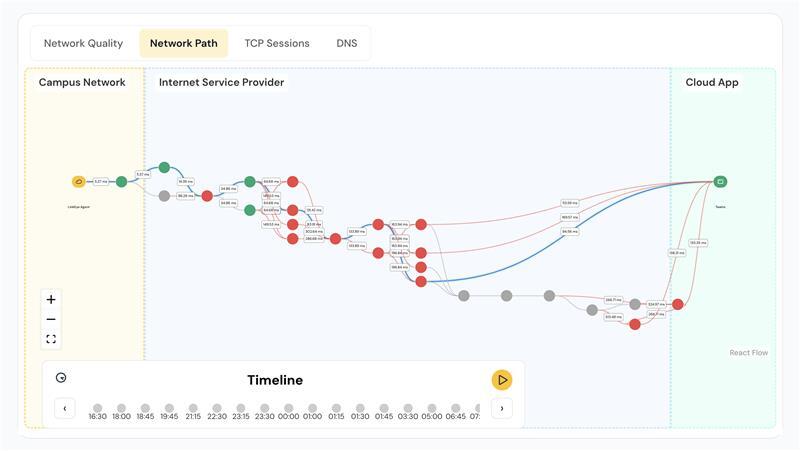
In today’s fast-paced digital world, maintaining a reliable and secure network is critical for businesses of all sizes. Network downtime, slow performance, and security vulnerabilities can have serious consequences, affecting productivity, customer experience, and overall business operations. To prevent such issues, enterprises rely on advanced enterprise network monitoring tools that provide real-time insights, optimized network management, and enhanced visibility into network operations.
In this blog, we will explore the top network monitoring solutions, their key features, and the pros and cons of each to help you make an informed decision.
1. Linkeye
Linkeye is a cutting-edge enterprise network monitoring tool designed to empower IT teams with real-time visibility, AI-driven troubleshooting, and optimized network performance. Its proactive approach ensures minimal downtime and smooth network operations.
Features:
- AI Troubleshooting: Detect and resolve network issues instantly with AI-powered diagnostics.
- SLA Tracking: Monitor service provider performance and ensure compliance with SLAs.
- Issue Detection: Identify complex problems like flapping underlay links before they impact operations.
- Real Utilization Visualization: Gain deep insights into bandwidth utilization and network traffic for better capacity planning.
- Cloud-Based Control: Manage multiple WAN links from a centralized dashboard.
- Quick Setup: Get started in under 30 minutes with an intuitive onboarding process.
- User-Friendly: Built with simplicity in mind, making it easy for all users.
- SD-WAN Integrations: Seamlessly integrate with SD-WAN setups.
- Rich Analytics: Collects data and provides detailed insights into response times, network performance, and cost optimizations.
Pros:
- AI-driven diagnostics for faster network issue resolution.
- SLA tracking ensures optimized network performance.
- Early detection of hard-to-spot problems.
- User-friendly dashboard with real-time insight.
- Seamless SD-WAN integration
- Offers rich analytics for informed decision-making.
- Visualize real utilization for efficient capacity planning.
Cons:
- Pricing details are not publicly available.
2. Atera
Atera is a cloud-based remote IT management platform tailored for MSPs (Managed Service Providers), IT consultants, and IT departments. It provides an affordable per-tech pricing model, enabling unlimited device management.
Features:
- Cloud-based remote IT management.
- Network Discovery to detect unmanaged devices.
- Integrated Remote Monitoring & Management (RMM), PSA, Remote Access, and Patch Management.
- Real-time performance monitoring and reporting.
Pros:
- Affordable flat-rate pricing for unlimited devices.
- User-friendly interface with a customized dashboard.
- Supports automated patch management and network monitoring.
Cons:
- May not be suitable for huge enterprises.
3. NinjaOne (Formerly NinjaRMM)
NinjaOne is an endpoint management solution ideal for IT teams and MSPs looking to enhance network security, automation, and remote management.
Features:
- Network operations monitoring for routers, switches, and firewalls.
- Full hardware and software inventory tracking.
- Automated OS and application patching.
- IT automation for streamlined workflows.
- Remote access capabilities for quick troubleshooting.
Pros:
- Improves network security and reduces ticket volumes.
- Provides real-time insight into IT infrastructure.
- User-friendly interface with custom reporting tools.
Cons:
- Pricing is based on a per-device model, which may be costly for larger organizations.
4. ManageEngine OpManager
ManageEngine OpManager provides a comprehensive network monitoring solution with a focus on performance tracking, security, and bandwidth utilization.
Features:
- Real-time visibility into network performance.
- Custom dashboard for monitoring network issues.
- IP Address Management (IPAM) and Switch Port Management (SPM).
- AI-powered reports and bandwidth monitoring.
Pros:
- Advanced network traffic analysis and reporting.
- Ideal for enterprises looking for customizable network monitoring solutions.
- Detects and resolves issues before they impact business operations.
Cons:
- Requires time to fully understand its feature-rich platform.
5. Site24x7 Network Monitoring
Site24x7 is an AI-powered performance monitoring tool that offers real-time insight into network health, security, and performance.
Features:
- Automated network discovery and device tracking.
- Custom SNMP monitoring for different vendor devices.
- NetFlow analysis for tracking traffic and bandwidth utilization.
- VPN and Cisco IPSLA-based VoIP monitoring.
- Custom reports and performance dashboards.
Pros:
- Supports real-time network monitoring.
- AI-driven performance tracking and cost optimization.
- Monitors a wide range of network devices and server operations.
Cons:
- No mention of a free trial period in the provided information.
Conclusion: Choosing the Right Enterprise Network Monitoring Tool
Selecting the right enterprise network monitoring tool is essential for ensuring seamless network performance, enhanced security, and optimized network management. Each of these tools offers unique features tailored for different business needs:
- Linkeye: Best for AI-driven real-time troubleshooting.
- Atera: Ideal for MSPs and IT consultants looking for an affordable all-in-one solution.
- NinjaOne: Great for endpoint security and IT automation.
- ManageEngine OpManager: Suitable for businesses needing detailed network analysis.
- Site24x7: Perfect for companies prioritizing AI-powered network monitoring.
To make an informed choice, evaluate your business’s specific needs, budget, and network monitoring priorities. Whether you need real-time insight, server monitoring, or bandwidth utilization tracking, there is a solution to help maintain your network’s health and performance effectively.