For most organizations, a few minutes of network downtime can seem like a routine inconvenience – something the IT team will eventually sort out. But those few minutes can ripple across departments. Productivity dips, especially since IT outages can cause nearly 50% of employees to experience significant work disruption. Internal tools slow to a crawl. Deadlines get pushed. And support teams start fielding complaints before they’ve had time to investigate.
That’s why network monitoring today needs to do more than just sending alerts after the incident. It should act as a first responder, pinpointing the source of issues in real time and giving your team a head-start before the problem spreads.
When the Network Slows Down, Business Does Too
The first misconception businesses fall into is assuming that downtime is a local issue, affecting only one team, one tool, or one segment. But from the moment a disruption begins, here’s what starts to unravel:
- Internal Teams Lose Momentum: Sales can’t access CRMs. Support tools lag. Collaboration apps freeze. The effect is immediate and widespread.
- Customer-Facing Operations Stall: If your platform or services are user-facing, even seconds of latency [1] can damage user experience and retention.
- IT Support Becomes a Bottleneck: Without visibility, L1 teams scramble to figure out what’s wrong. The delay isn’t just frustrating, it’s expensive.
Every minute becomes a multiplier of inefficiency, frustration, and loss.
[1] 79% of users say they’re less likely to return to a website if they experience performance issues. Source: Akamai/Web Performance Report.
Start Troubleshooting with the Why
Today’s network environments are more distributed than ever. In fact, over 60% of enterprises now operate in hybrid environments combining cloud and on-prem systems, increasing the surface area for performance issues. Traditional monitoring tools can tell you that something is wrong, but not necessarily where or why.
What businesses now need are not just better alerts. They need tools that can:
- Continuously baseline network behaviour.
- Detect when performance deviates from that baseline.
- Automatically test and identify the cause.
- Offer actionable guidance, not just raw data.
This is where intelligent diagnostics enters the picture.
From Guesswork to Guidance: Insights That Drive Action
Here’s the shift that saves time: Instead of waiting for a Level 1 engineer to begin basic troubleshooting, a process that can take up to 40% of the average IT team’s time, the system runs those tests the moment some metrics have deviated from the baseline trends.
With features like Co-Pilot, LinkEye actively monitors performance standards, automatically initiates tests when anomalies occur, and surfaces root cause insights through digestible summaries.
It’s not fixing the problem for you, but it’s dramatically reducing time to resolution. Think of it as getting a head start on troubleshooting before you even open your laptop.
This is L1 diagnostics done faster, without the personnel lag. In some cases, automating first-line diagnostics has been shown to reduce MTTR (mean time to resolution) by over 60% [Source: EMA Research on Network Performance Monitoring]
Pinpoint Trouble Areas
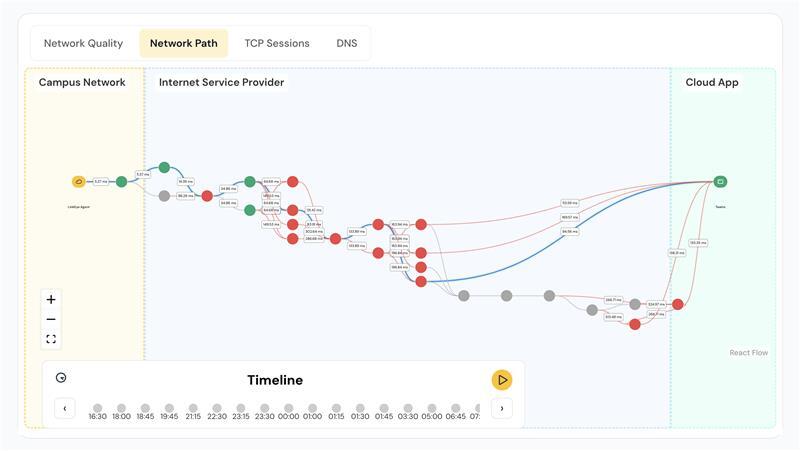
One of the trickiest parts of diagnosing network issues is figuring out where the breakdown is happening, especially in a hybrid or cloud-based environment. That’s where Digital Experience Monitoring (DeX) earns its keep.
With DeX, you’re not just looking at a network topology map. You’re getting:
• Traceroute-level path analysis that pinpoints exactly which segment is causing the delay.
• Visual mapping of nodes so you know which segments are affected.
• Insight into internal and external applications tied to the issue.
This helps teams quickly correlate technical issues with their business impact and prioritize what needs attention first.
Too Much Data, Not Enough Answers? Here’s the Fix
Even the best monitoring tools fall short when they overwhelm teams with noise [2]. The difference between raw data and useful insight is context, and that’s what these advanced systems aim to provide.
For example, LinkEye’s Co-Pilot doesn’t just say, “There’s a problem.” It runs guided diagnostics and then tells you:
- What the issue is.
- Why it occurred.
- What the likely next steps should be.
It is not automation for the sake of automation, it is Context-Driven Troubleshooting.
[2] 70% of IT professionals say alert fatigue impacts their ability to respond effectively to actual problems. Source: PagerDuty State of Digital Operations.
Why Smarter Monitoring Makes Your Whole Business More Resilient
Here’s the real story: IT teams don’t work in isolation. Every delay they face is a delay that cascades to product, customer service, finance, and operations.
When you reduce the time between alert and action, you recover hours of productive time across the company, reduce customer complaints, and preserve internal trust.
By giving your engineers the space to focus on solutions, not symptoms, we can respond to issues with the speed and clarity they deserve – not by replacing humans, but by giving them a head start they need.